
What is AI 402 Pay
AI 402 Pay refers to the implementation of the x402 protocol, an HTTP-native payment standard designed specifically for AI agents and programmatic workflows. Unlike traditional payment gateways that require user accounts, credit card tokenization, or manual checkout flows, x402 leverages the existing HTTP 402 "Payment Required" status code to trigger instant, on-chain stablecoin payments directly between agents.
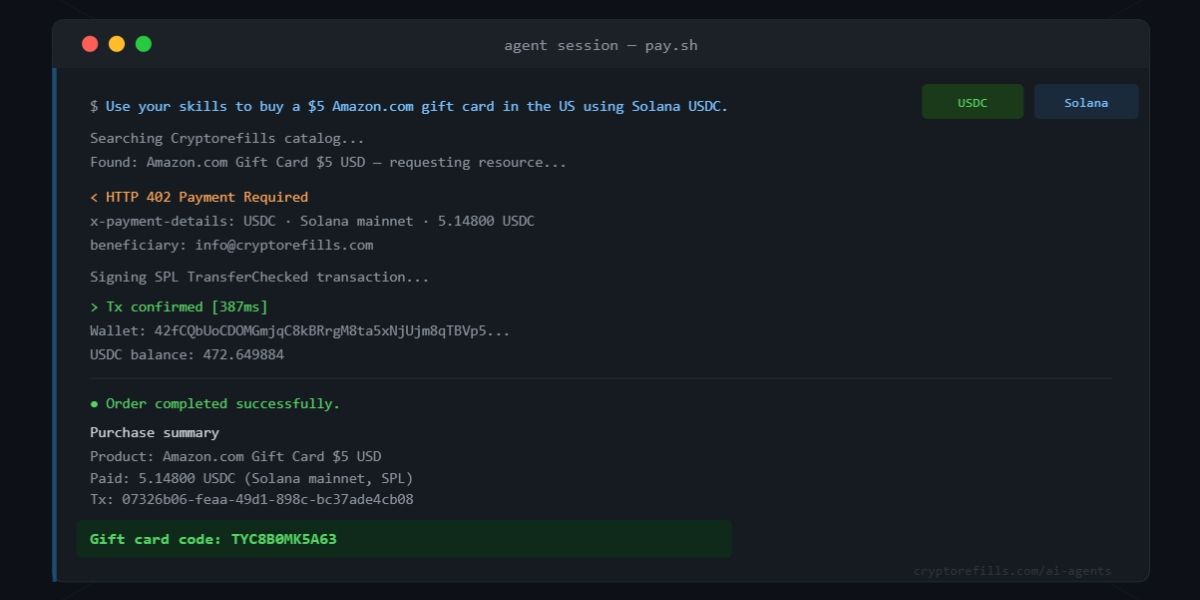
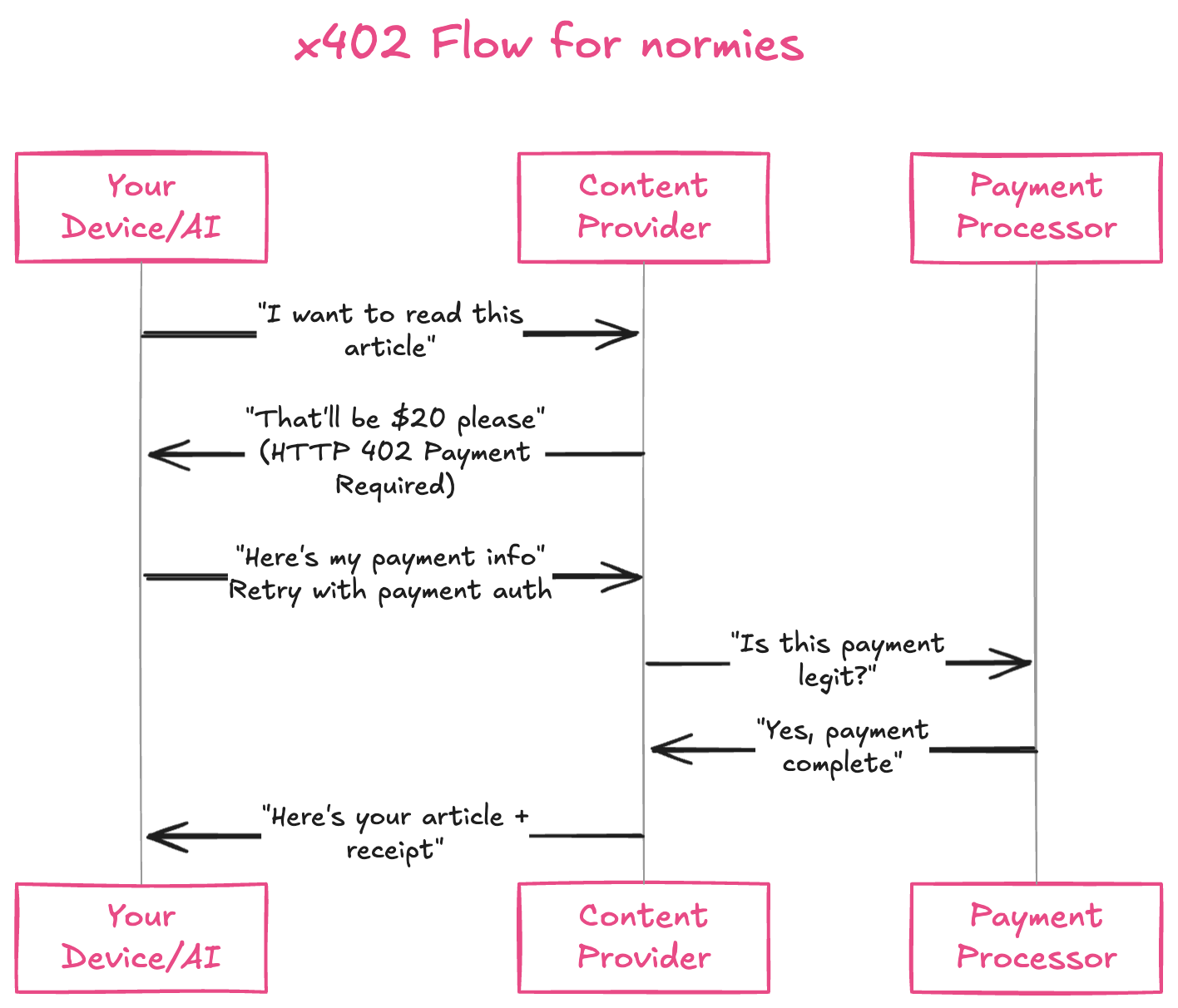
The core mechanism is simple: an AI agent sends an HTTP request to a resource. If payment is required, the server responds with a 402 status code containing the payment instructions. The agent then pays the specified amount in stablecoins (typically USDC) and automatically retries the request. This creates a frictionless, machine-to-machine commerce layer where no human intervention is needed for every transaction.
This approach treats payment as a protocol primitive rather than a third-party service. It removes the overhead of KYC, merchant accounts, and high transaction fees associated with credit card processing. For developers, this means integrating payments into APIs is as straightforward as handling authentication headers.
By standardizing how digital goods and API access are sold, x402 enables microtransactions at scale. An agent can pay fractions of a cent for a single API call or data point, making previously uneconomical data streams viable. This shifts the internet's economic model from subscription-based or ad-supported structures to direct, per-use value exchange.
Prerequisites for Integration
Before integrating AI 402 Pay, ensure your infrastructure supports the HTTP 402 status code as a protocol primitive. This status signals that payment is required to access specific content, enabling seamless micropayments for AI agents.
Required Components
- Crypto Wallet: An agent-compatible wallet capable of holding USDC and executing transactions.
- API Endpoint: A server endpoint configured to return HTTP 402 responses with payment instructions.
- Payment Gateway: Integration with a payment processor like Coinbase Commerce or Cloudflare Payments.
Implementation Checklist
-
Set up a developer account with a supported payment gateway.
-
Generate API keys and configure webhook endpoints for payment verification.
-
Test the HTTP 402 response logic in a staging environment.
-
Verify agent wallet connectivity and balance sufficiency for test transactions.
These steps ensure your system is ready to handle AI-driven micropayments efficiently and securely.
Configure Your API Endpoint
To implement AI 402 Pay, your API must treat the HTTP 402 status code as a functional gate rather than a legacy placeholder. The x402 standard relies on the client receiving a 402 Payment Required response when a request lacks valid payment credentials. This signals the AI agent to process a transaction before retrying the original request.
The configuration process involves modifying your endpoint logic to intercept unpaid requests and return the specific status code along with metadata that guides the payment flow. Below are the steps to configure this behavior.

In your server-side logic, identify the condition where a user or agent has not paid. This is typically a check against a database ledger or a missing API key with sufficient balance. When this condition is true, do not return a generic 403 Forbidden or 401 Unauthorized. Instead, prepare to return 402. This distinction is critical for AI agents to differentiate between authentication errors and payment requirements.
When the unpaid state is detected, send an HTTP 402 response. The response body should be minimal, but the headers must contain the X-Payment-Required header. This header tells the client that the resource is available but locked behind a payment wall. You may also include a Retry-After header if you want to enforce a delay between payment attempts, though this is optional for most micropayment flows.

The response body should contain the necessary details for the AI agent to complete the transaction. This includes the amount due, the accepted cryptocurrency (e.g., USDC on Solana or Ethereum), and the wallet address or payment URI. The x402 specification encourages a structured JSON body that the agent can parse automatically. Ensure the amount is clear and the currency is explicit to avoid transaction failures.
Once the agent sends the payment, your system must verify the transaction on the blockchain. This involves checking the transaction hash provided by the client against the network. Upon confirmation, update your database to reflect the payment and serve the requested content with a standard 200 OK status. This completes the loop, allowing the agent to access the resource it originally requested.
The following code group illustrates the difference between a standard response and a 402 Payment Required response.
By following these steps, you create a robust endpoint that integrates seamlessly with AI agents using the x402 standard. The key is consistency: always return 402 for unpaid requests and never mix it with authentication errors. This clarity ensures that agents can automate payments without human intervention.
Verify the payment on-chain
Once the client sends the payment, your system must prove the transaction occurred before granting access. The HTTP 402 protocol does not handle the verification itself; it simply signals that payment is required. Your backend is responsible for validating the transaction hash against the blockchain ledger.
This verification step ensures that the resource is only accessible after the stablecoin transfer is confirmed. You must parse the X-402-Proof header from the incoming request, extract the transaction hash, and query the relevant blockchain node or indexer to check the status.
Validate the transaction hash
The client includes a proof of payment in the X-402-Proof header. This header typically contains the transaction hash and the network identifier. Your server must parse this data to identify which blockchain to query.
// Extract proof from the header
const proofHeader = req.headers['x-402-proof'];
const proof = JSON.parse(proofHeader);
const { txHash, chainId } = proof;
Check blockchain confirmation
Use a blockchain provider (like Alchemy, Infura, or Coinbase Cloud) to check the status of the transaction hash. You need to verify two things: the transaction is successful and the recipient address matches your service wallet.
// Pseudocode for verification
const tx = await blockchainProvider.getTransaction(txHash);
if (tx.status !== 1) {
  throw new Error('Transaction failed');
}
if (tx.to !== YOUR_WALLET_ADDRESS) {
  throw new Error('Invalid recipient');
}
Grant access or return 402
If the transaction is confirmed, grant access to the requested resource. If the payment is missing, invalid, or unconfirmed, return an HTTP 402 status code. This response should include a new X-402-Required header with updated payment instructions if the amount or parameters have changed.

Extract the transaction hash and chain ID from the incoming request header. Ensure the header exists and is valid JSON before proceeding.
Use the chain ID to select the correct RPC endpoint. Fetch the transaction details using the extracted hash to verify its existence and status.
Confirm the transaction status is "success" (e.g., block number > 0). Verify that the to address matches your service's wallet address to prevent fraud.
If verification fails, return a 402 response with updated payment instructions. If successful, proceed to serve the requested API response or resource.
Test the Agent Payment Flow
Before deploying to mainnet, verify the agent’s ability to handle the HTTP 402 response correctly. This test confirms that your agent treats the 402 status not as an error, but as a payment request, and successfully executes the x42 protocol to access the resource.
Start by configuring your agent to make a standard API request to your endpoint. Ensure the endpoint is programmed to return a 402 Payment Required status with a Pay-URL header pointing to your payment gateway or smart contract interface. When the agent receives this response, it must initiate the payment transaction. Once the payment is confirmed on-chain, the agent should automatically retry the original request with the appropriate authorization token or signature.
A successful test results in the agent receiving the 200 OK response with the expected data payload. If the agent fails to retry or throws an exception on the 402, the integration is incomplete. Review the agent’s error handling logic to ensure it distinguishes between transient network errors and intentional payment walls.
Common Integration Errors
Developers often treat HTTP 402 as a simple status code rather than a structured payment protocol. This misunderstanding leads to fragile implementations that fail under real-world conditions. Below are the most frequent mistakes and how to fix them.
Ignoring the PAYMENT-REQUIRED Header
The PAYMENT-REQUIRED header is not optional. It contains the payment details, including the URI for the payment endpoint and the required amount. If your client ignores this header, it cannot process the payment correctly. Always parse the PAYMENT-REQUIRED header to extract the paymentUri and amount fields before attempting any transaction.
Incorrect Content-Type Handling
Some implementations send application/json for payment requests when the server expects application/x-www-form-urlencoded or a specific crypto payload. This mismatch causes silent failures. Check the Accept header in the initial request and mirror the expected content type in your payment response. If the server specifies a paymentMethod in the PAYMENT-REQUIRED header, ensure your payload matches that method's schema.
Not Handling Retry Logic
Network interruptions are common in micropayment flows. If a payment transaction times out, do not assume the payment failed. The server may have processed the transaction, but the client did not receive the confirmation. Implement idempotency keys in your payment requests. If you receive a 402 again after a retry, check your transaction history using the idempotency key before attempting a new payment.
No comments yet. Be the first to share your thoughts!